One customer wants their monthly statement delivered by email. Another needs the file saved to a shared folder so their accounts team can pick it up. A third wants both.
The report may be the same, but the delivery requirements are different.
With conditional execution of reports and destinations in remiCrystal, you can make those decisions part of your reporting workflow. Conditions let you control whether a report runs and whether a destination delivers, based on values available when the task executes.
A practical example: customer statement delivery
Imagine a distributor that generates monthly statements for its customers.
Northside Supplies wants its statement emailed to the accounts department. Riverside Manufacturing uses an internal process that collects files from a local network share, so it does not need an email.
Instead of maintaining a separate task for every delivery preference, you can configure conditions on the destinations within your reporting workflow.
For this example, assume your customer data makes two delivery flags available as remiCrystal variables: SendEmail and SaveToShare. These are illustrative names for values you supply, rather than built-in settings.
| Customer | SendEmail | SaveToShare | Required delivery |
|---|---|---|---|
| Northside Supplies | Yes | No | |
| Riverside Manufacturing | No | Yes | Shared folder |
| Central Services | Yes | Yes | Email and shared folder |
Configure an email destination with the condition SendEmail is Yes, and a file destination with SaveToShare is Yes.
As the workflow processes each customer, remiCrystal evaluates the conditions using the values available for that customer:
- Northside’s statement is emailed, and the file destination is skipped.
- Riverside’s statement is saved to the configured share, and the email destination is skipped.
- Central’s statement is delivered through both destinations.
The conditions control which destinations execute. Your existing report parameters, recipient settings and output paths still determine the report content and where it goes.
Decide whether a report should run, too
Delivery preferences are only one part of the process. Sometimes a report is only relevant when a particular business condition is met.
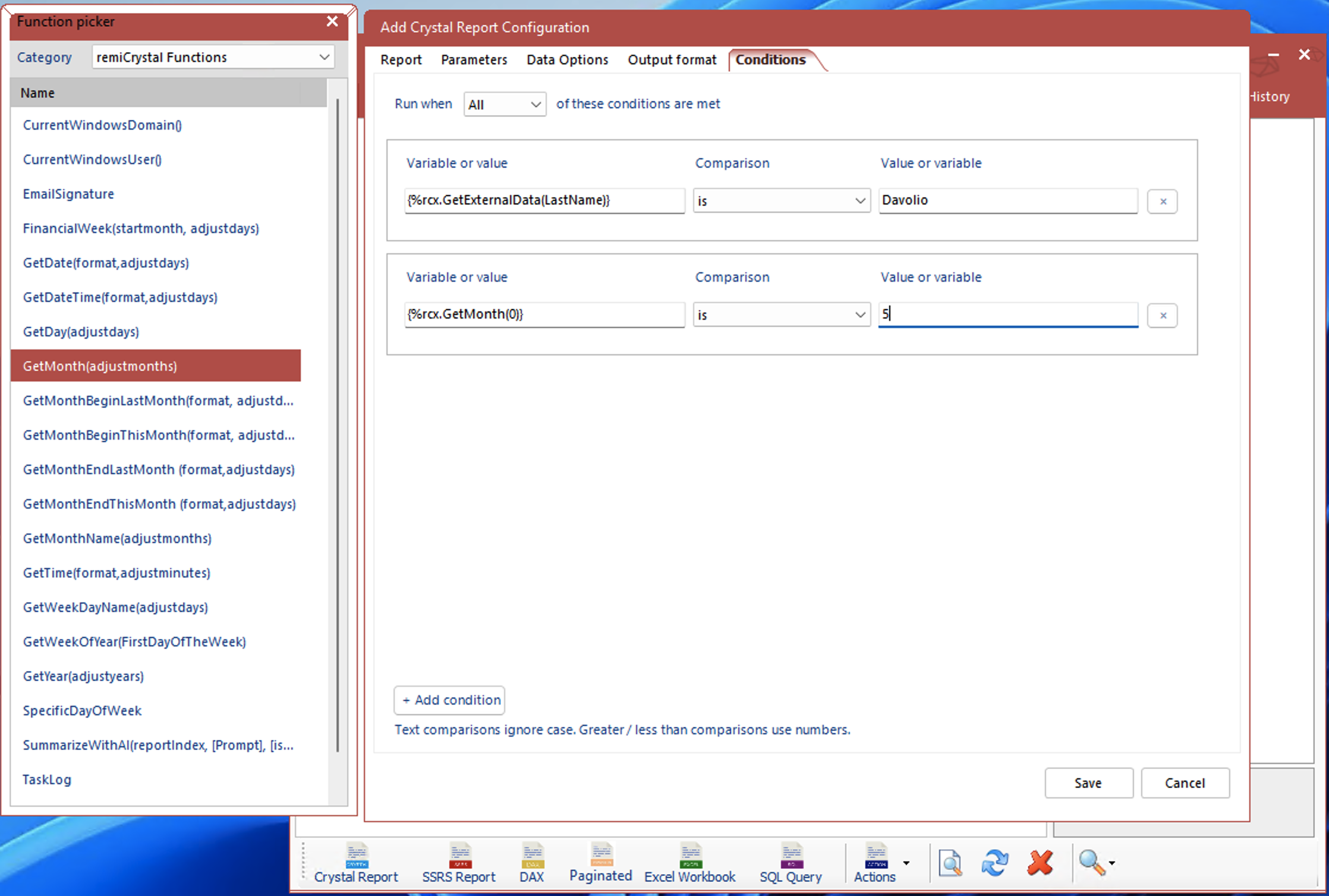
For example, you might generate an overdue-account report only when a customer’s overdue balance is greater than zero. A customer with no overdue balance does not need that report generated.
That gives you two useful decision points:
- Report conditions: Should this report run?
- Destination conditions: Should this destination deliver?
You can use either independently or combine them. An overdue-account report could run only for customers with an outstanding balance, then use destination conditions to choose email, a shared folder, or both.
Values such as an overdue balance must be supplied through the variables available to the workflow; the condition itself does not calculate that balance.
Build rules around your business process
The Conditions tab lets you compare variables and values using readable rules such as is, is not, contains, is empty, and is greater than.
When you add multiple conditions, choose whether All or Any must match.
For an email destination, for example, you could require all of the following:
- SendEmail is Yes.
- The customer’s email address is not empty.
Text comparisons ignore case, while greater-than and less-than comparisons use numeric values. Reports and destinations with no conditions continue to run or deliver as usual.
When conditions are not met, remiCrystal records an informational message explaining that the report or destination was skipped, helping you understand why a particular action did not take place.
More ways to put conditions to work
The same approach can support other everyday reporting needs:
- Generate an exception report only when an exception count is greater than zero.
- Deliver a report to a regional destination only when the region matches.
- Produce an additional report only for customers whose service tier includes it.
- Save an archive copy only for customers with an archive flag enabled.
Each example follows the same principle: make the business value available to the workflow, then attach a condition to the report or destination it should control.
Make delivery preferences part of the workflow
Customer requirements rarely fit a single delivery method. Conditional execution gives you a way to express those differences directly in remiCrystal.
Start with a straightforward case: one customer needs an email, another needs a file on a shared folder. Configure the destinations, connect the conditions to your customer data, and let the workflow choose the appropriate delivery for each customer.